> For the complete documentation index, see [llms.txt](https://docs.thub.tech/llms.txt). Markdown versions of documentation pages are available by appending `.md` to page URLs; this page is available as [Markdown](https://docs.thub.tech/langchain/output-parsers.md).
# 🔀Output Parsers
An output parser acts as a translator between LLMs and your application. It takes the raw, unformatted text generated by an LLM and transforms it into a more usable format suited for your needs.
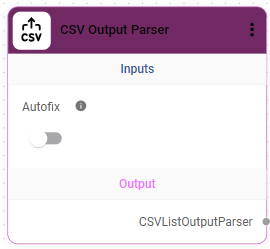
#### 1)CSV Output Parser
Parse the output of an LLM call as a comma-separated list of values.
#### Key Features:
• CSV Formatting: Converts responses into comma-separated values\
• Structured Output: Ensures consistent tabular data format\
• Autofix Option: Automatically fixes minor formatting issues
#### Setup Requirements:
1. Add CSV Output Parser node to the canvas
2. Enable Autofix if required
3. Connect the parser to a chat model output
#### Use Cases:
• Exporting data in CSV format\
• Tabular data generation
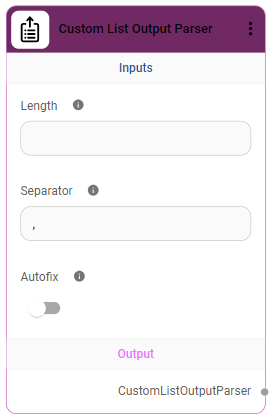
#### **2)Custom List Output Parser**
Parse the output of an LLM call as a list of values.
#### Key Features:
• Custom Formatting: Define list length and separator\
• Flexible Output: Supports different list structures\
• Autofix Option: Handles formatting inconsistencies
#### Setup Requirements:
1. Add Custom List Output Parser node to the canvas
2. Set Length (number of items)
3. Define Separator (example: comma, newline)
4. Enable Autofix if required
5. Connect to model output
#### Use Cases:
• Generating lists from responses\
• Structured text formatting
#### 3)Structured Output Parser
Parse the output of an LLM call into a given (JSON) structure.
#### Key Features:
• Structured Data: Converts output into defined schema\
• Autofix Support: Fixes minor formatting issues\
• Consistent Responses: Ensures predictable output
#### Setup Requirements:
1. Add Structured Output Parser node to the canvas
2. Enable Autofix if required
3. Connect parser with model output
#### Use Cases:
• Structured response generation\
• API-ready outputs
#### 4)Advanced Structured Output Parser
Parse the output of an LLM call into a given structure by providing a Zod schema.
#### Key Features:
• JSON Schema Support: Uses schema for structured output\
• High Accuracy: Ensures correct format strictly\
• Autofix Option: Handles minor formatting errors
#### Setup Requirements:
1. Add Advanced Structured Output Parser node to the canvas
2. Enable Autofix if required
3. Provide Example JSON schema
4. Connect parser to model output
#### Use Cases:
• JSON-based applications\
• Data validation and structured responses